Nhờ Copilot viết script
- 🇻🇳 Tiếng Việt
- 🇬🇧 English
- 🇰🇷 한국어
- 🇨🇳 中文
Không muốn tự viết? Mô tả bằng lời cho Copilot: Copilot viết FireAnt Script, chạy thử trên biểu đồ đang mở, tự sửa lỗi, rồi gắn script lên biểu đồ và mở mã trong trình soạn để bạn xem, chỉnh. Copilot cũng giải thích một script có sẵn, sửa script của bạn, đổi tham số và kiểm thử chiến lược.
Cách nhờ
Thiết yếu — Copilot dùng hạn mức AI của gói hội viên.
- Mở biểu đồ FireAnt Chart của mã bạn muốn (Copilot làm việc trên biểu đồ đang chọn).
- Hỏi ở một trong hai chỗ:
- panel Copilot ở dock bên phải: khi đang chọn biểu đồ FireAnt Chart, câu bạn gửi do Trợ lý Chart — chuyên gia về biểu đồ trong Copilot — làm (Trợ lý Chart);
- thẻ Copilot của khung script: hỏi về đúng script đang mở trong trình soạn (bên dưới).
- Gõ yêu cầu. Câu trả lời hiện ở panel Copilot; script Copilot viết / sửa mở trong trình soạn.
Thẻ Copilot của khung script
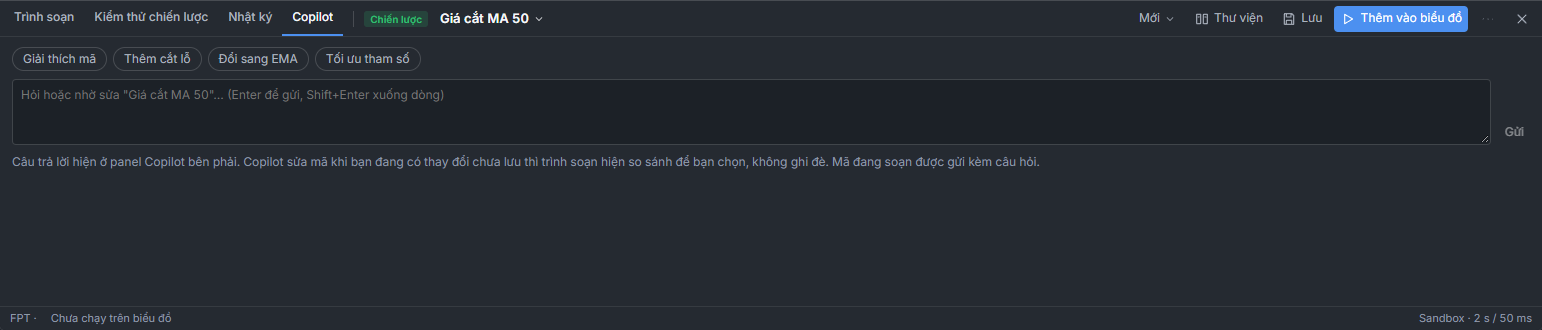
- Gợi ý nhanh: Giải thích mã (giải thích từng khối, dẫn số dòng), Đổi sang EMA; với chiến lược thêm Thêm cắt lỗ (cắt lỗ theo % có tham số) và Tối ưu tham số (tối ưu rồi kiểm tra walk-forward, chưa đổi tham số khi bạn chưa đồng ý); đang có lỗi thì thêm Sửa lỗi biên dịch. Bấm là gửi ngay.
- Ô hỏi — gõ câu về script đang mở (Hỏi hoặc nhờ sửa "…"), Enter để gửi, Shift+Enter xuống dòng. Copilot nhận kèm tên, loại script; mã đang soạn chưa lưu được gửi kèm câu hỏi.
- Lỗi khi chạy (dải đỏ trên trình soạn, thẻ Nhật ký) có nút Sửa giúp tôi: Copilot sửa đúng lỗi đó, giữ ý đồ và tham số, chạy lại rồi nói đã sửa gì.
Copilot làm được gì với script
| Bạn nói | Copilot làm |
|---|---|
| "Viết chỉ báo đánh dấu phiên khối lượng gấp 3 lần trung bình 20 phiên" | Viết chỉ báo mới, chạy thử, gắn lên biểu đồ |
| "Viết chiến lược mua khi RSI 2 dưới 10 trong xu hướng tăng, bán khi RSI trên 70, dừng lỗ 8 %" | Viết chiến lược bằng signals + risk, hiện ▲ / ▼ |
| "Script này làm gì?", "Giải thích dòng 12" | Đọc mã, giải thích theo từng khối (tham số, tín hiệu, đầu ra) |
| "Thêm tham số cho chu kỳ", "Đổi màu đường thành vàng", "Thêm cảnh báo khi cắt lên" | Sửa đúng chỗ trong script đang có (giữ phần còn lại) |
| "Đổi chu kỳ thành 21" | Đổi tham số của script trên biểu đồ |
| "Kiểm thử chiến lược này", "Lãi bao nhiêu?" | Chạy bảng kiểm thử, tóm tắt lợi nhuận, số giao dịch, sụt giảm, Sharpe |
| "Tối ưu chu kỳ EMA", "Tham số có quá khớp không?" | Chạy tối ưu và walk-forward trên mã, khung đang xem; báo bộ tốt nhất và mức ổn định, mở kết quả ở bảng kiểm thử |
| "Gỡ script vừa viết" | Gỡ script do Copilot thêm |
| "Cách dùng d.tf thế nào?" | Trả lời theo tài liệu hướng dẫn |
Copilot làm việc thế nào
- Viết từ mẫu gần nhất trong tham chiếu ngôn ngữ, chỉ dùng hàm có thật — không chép cú pháp Pine hay bịa hàm.
- Biên dịch và chạy thử ngay trên mã, khung đang xem. Có lỗi biên dịch, lỗi chạy, nhìn trước, hoặc biểu đồ trống → Copilot tự sửa, tối đa 3 lần cho mỗi script; vẫn lỗi thì dừng, giải thích lỗi và hỏi bạn.
- Kiểm tra kết quả hợp lý: tín hiệu 0 lần hoặc gần như mọi nến là dấu hiệu điều kiện sai — Copilot xem lại trước khi báo xong.
- Sửa nhỏ: khi sửa script có sẵn, Copilot sửa từng đoạn chứ không viết lại cả tệp, và lưu thành bản mới (bản cũ vẫn ở Phiên bản trước; bản Copilot viết có nhãn Copilot).
- Không ghi đè mã bạn đang sửa: trình soạn đang có thay đổi chưa lưu mà Copilot sửa cùng script thì thanh trên trình soạn ghi Copilot đã sửa "…" (bản …) trong lúc bạn đang sửa, trình soạn hiện so sánh (xanh: Copilot thêm, đỏ: bỏ so với mã của bạn). Chọn Áp dụng bản Copilot hoặc Giữ bản của tôi — mã của bạn đã được lưu thành một phiên bản nên chọn bản nào cũng không mất. Copilot viết một script khác thì thanh mời Mở bản Copilot.
- Mẫu FireAnt và script Cộng đồng chỉ đọc: muốn đổi, Copilot viết một bản sao của bạn.
- Mỗi thao tác của Copilot là một bước hoàn tác được trên biểu đồ.
Copilot không tự đặt cảnh báo (bạn bật trong Cảnh báo theo script), không đặt lệnh giao dịch, và không hứa lợi nhuận. Kiểm thử ít hơn 30 giao dịch thì Copilot nói rõ là mẫu nhỏ.
Viết yêu cầu sao cho tốt
| Nên | Ví dụ |
|---|---|
| Nói rõ loại: chỉ báo hay chiến lược | "Viết chiến lược…", "Viết chỉ báo ở ngăn riêng…" |
| Nói rõ điều kiện bằng số | "RSI 14 dưới 30", "khối lượng gấp 2 lần trung bình 20 phiên" |
| Nói vẽ gì, ở đâu | "mũi tên dưới nến", "tô nền xanh", "vẽ trên giá" |
| Nói cái gì cần chỉnh được | "cho phép chỉnh chu kỳ và ngưỡng" → Copilot đưa thành tham số |
| Chiến lược: nói vào, ra, rủi ro | "mua khi …, bán khi …, dừng lỗ 7 %, giữ tối đa 20 phiên" |
| Sửa từng bước | Viết bản đơn giản trước, rồi "thêm lọc MA200", "thêm cảnh báo" |
Ví dụ yêu cầu đầy đủ:
Viết chỉ báo trên giá: EMA 20 và EMA 50; mũi tên lên dưới nến khi EMA 20 cắt lên EMA 50 và giá trên MA 200, mũi tên xuống khi cắt xuống; tô nền xanh nhạt khi giá trên MA 200. Cho chỉnh hai chu kỳ EMA. Thêm cảnh báo khi có mũi tên lên.
Copilot sẽ viết một script như (mã có thể khác tuỳ lần):
indicator({
  name: "EMA 20/50 có lọc MA 200",
  pane: "price",
  params: {
    fast: param.int(20, { min: 5, max: 100, label: "EMA nhanh" }),
    slow: param.int(50, { min: 10, max: 300, label: "EMA chậm" }),
  },
  plot: (d, p) => {
    const f = ta.ema(d.close, p.fast);
    const s = ta.ema(d.close, p.slow);
    const trenMa200 = d.close.gt(ta.sma(d.close, 200));
    return {
      [`EMA ${p.fast}`]: line(f, { color: "accent" }),
      [`EMA ${p.slow}`]: line(s, { color: "ref" }),
      "Cắt lên": shape(f.crossAbove(s).and(trenMa200), { at: "below", shape: "arrowUp", color: "up" }),
      "Cắt xuống": shape(f.crossBelow(s), { at: "above", shape: "arrowDown", color: "down" }),
      "Trên MA 200": bgcolor(trenMa200, { color: "up", opacity: 0.05 }),
    };
  },
  alerts: (d, p) => ({
    "Cắt lên trên MA 200": ta.ema(d.close, p.fast).crossAbove(ta.ema(d.close, p.slow)).and(d.close.gt(ta.sma(d.close, 200))),
  }),
});
Sau khi Copilot viết
- Script mở trong khung script, có trong Thư viện › Của tôi. Đọc mã, rê chuột lên biểu đồ xem giá trị trong mã, chỉnh tham số ở cột Tham số. Muốn quay lại bản trước: ⋯ › Phiên bản › Quay lại bản ….
- Muốn hiểu một dòng: hỏi Copilot, hoặc tra Tham chiếu.
- Chiến lược: luôn kiểm thử trên nhiều mã, nhiều kỳ trước khi tin (Bài 10, Bài 11). Kết quả kiểm thử và lời Copilot là thông tin tham khảo, không phải khuyến nghị đầu tư.
Mô tả bộ lọc bằng lời ("RSI dưới 30 và khối lượng gấp đôi trung bình") ở Lọc bằng lời: bộ lọc có nút Xem dạng script và Mở trong khung Script — FireAnt Script sinh từ bộ lọc, lưu vào Script của tôi để bạn sửa tiếp, đặt cảnh báo hay lọc bằng script.
Don't want to write it yourself? Describe it to Copilot in words: Copilot writes the FireAnt Script, test-runs it on the open chart, fixes errors on its own, then attaches the script to the chart and opens the code in the editor so you can review and tweak it. Copilot can also explain an existing script, fix your script, change parameters and backtest strategies.
How to ask
Essential — Copilot uses your membership plan's AI quota.
- Open the FireAnt Chart of the ticker you want (Copilot works on the selected chart).
- Ask in one of two places:
- the Copilot panel in the right-hand dock: while a FireAnt Chart is selected, your message is handled by Trợ lý Chart (Chart Assistant) — Copilot's chart specialist (Chart Assistant);
- the Copilot tab of the script pane: ask about the exact script open in the editor (below).
- Type your request. The answer appears in the Copilot panel; scripts Copilot writes / fixes open in the editor.
The Copilot tab of the script pane
- Quick suggestions: Giải thích mã (Explain code) (explains each block, citing line numbers), Đổi sang EMA (Switch to EMA); for strategies, also Thêm cắt lỗ (Add stop loss) (a percentage stop loss with a parameter) and Tối ưu tham số (Optimize parameters) (optimizes, then checks walk-forward, without changing parameters until you agree); when there is an error, also Sửa lỗi biên dịch (Fix compile error). Clicking sends it right away.
- Question box — type a question about the open script (Hỏi hoặc nhờ sửa "…" (Ask or request a fix for "…")), Enter to send, Shift+Enter for a new line. Copilot receives the script's name and type; unsaved code in the editor is sent along with your question.
- Runtime errors (the red bar on the editor, the Nhật ký (Log) tab) have a Sửa giúp tôi (Fix it for me) button: Copilot fixes that exact error, keeps your intent and parameters, runs it again and tells you what it changed.
What Copilot can do with scripts
| You say | Copilot does |
|---|---|
| "Write an indicator that marks sessions with volume 3 times the 20-session average" | Writes a new indicator, test-runs it, attaches it to the chart |
| "Write a strategy that buys when RSI 2 is below 10 in an uptrend, sells when RSI is above 70, with an 8% stop loss" | Writes the strategy with signals + risk, shows ▲ / ▼ |
| "What does this script do?", "Explain line 12" | Reads the code and explains it block by block (parameters, signals, outputs) |
| "Add a parameter for the period", "Make the line yellow", "Add an alert on the upward cross" | Edits exactly that part of the existing script (keeping the rest) |
| "Change the period to 21" | Changes the parameter of the script on the chart |
| "Backtest this strategy", "How much does it make?" | Runs the backtest table and summarizes return, number of trades, drawdown and Sharpe |
| "Optimize the EMA period", "Are the parameters overfit?" | Runs optimization and walk-forward on the ticker and timeframe you are viewing; reports the best set and stability, and opens the results in the backtest table |
| "Remove the script you just wrote" | Removes the script Copilot added |
| "How do I use d.tf?" | Answers from the user guide |
How Copilot works
- Writes from the closest example in the language reference, using only functions that exist — it does not copy Pine syntax or invent functions.
- Compiles and test-runs immediately on the ticker and timeframe you are viewing. On a compile error, runtime error, look-ahead, or an empty chart → Copilot fixes it on its own, up to 3 times per script; if it still fails, it stops, explains the error and asks you.
- Checks that results make sense: zero signals, or a signal on almost every candle, suggests a wrong condition — Copilot reviews it before reporting done.
- Small edits: when editing an existing script, Copilot changes it section by section rather than rewriting the whole file, and saves it as a new version (the old one stays under Phiên bản trước (Previous versions); versions written by Copilot are labeled Copilot).
- Never overwrites code you are editing: if the editor has unsaved changes and Copilot edits the same script, the bar above the editor shows Copilot đã sửa "…" (bản …) trong lúc bạn đang sửa (Copilot edited "…" (version …) while you were editing), and the editor shows a diff (green: added by Copilot, red: removed compared with your code). Choose Áp dụng bản Copilot (Apply Copilot's version) or Giữ bản của tôi (Keep my version) — your code has already been saved as a version, so you lose nothing either way. If Copilot writes a different script, the bar offers Mở bản Copilot (Open Copilot's version).
- FireAnt templates and Community scripts are read-only: to change them, Copilot writes a copy of your own.
- Each Copilot action is one undoable step on the chart.
Copilot does not set alerts by itself (you turn them on in Cảnh báo theo script (Script alerts)), does not place trading orders, and does not promise profits. For backtests with fewer than 30 trades, Copilot states clearly that the sample is small.
Writing good requests
| Do | Example |
|---|---|
| State the type: indicator or strategy | "Write a strategy…", "Write an indicator in a separate pane…" |
| State conditions with numbers | "RSI 14 below 30", "volume 2 times the 20-session average" |
| Say what to draw and where | "arrows below the candle", "green background", "draw on price" |
| Say what should be adjustable | "let me adjust the period and threshold" → Copilot turns them into parameters |
| Strategies: state entry, exit, risk | "buy when …, sell when …, 7% stop loss, hold at most 20 sessions" |
| Edit step by step | Write a simple version first, then "add an MA200 filter", "add an alert" |
A complete example request:
Write an indicator on price: EMA 20 and EMA 50; an up arrow below the candle when EMA 20 crosses above EMA 50 and price is above MA 200, a down arrow when it crosses below; shade the background light green when price is above MA 200. Make both EMA periods adjustable. Add an alert when an up arrow appears.
Copilot will write a script like this (the code may differ each time):
indicator({
  name: "EMA 20/50 có lọc MA 200",
  pane: "price",
  params: {
    fast: param.int(20, { min: 5, max: 100, label: "EMA nhanh" }),
    slow: param.int(50, { min: 10, max: 300, label: "EMA chậm" }),
  },
  plot: (d, p) => {
    const f = ta.ema(d.close, p.fast);
    const s = ta.ema(d.close, p.slow);
    const trenMa200 = d.close.gt(ta.sma(d.close, 200));
    return {
      [`EMA ${p.fast}`]: line(f, { color: "accent" }),
      [`EMA ${p.slow}`]: line(s, { color: "ref" }),
      "Cắt lên": shape(f.crossAbove(s).and(trenMa200), { at: "below", shape: "arrowUp", color: "up" }),
      "Cắt xuống": shape(f.crossBelow(s), { at: "above", shape: "arrowDown", color: "down" }),
      "Trên MA 200": bgcolor(trenMa200, { color: "up", opacity: 0.05 }),
    };
  },
  alerts: (d, p) => ({
    "Cắt lên trên MA 200": ta.ema(d.close, p.fast).crossAbove(ta.ema(d.close, p.slow)).and(d.close.gt(ta.sma(d.close, 200))),
  }),
});
After Copilot writes it
- The script opens in the script pane and is listed under Thư viện › Của tôi (Library › Mine). Read the code, hover over the chart to see values in the code, and adjust parameters in the Tham số (Parameters) column. To go back to an earlier version: ⋯ › Phiên bản › Quay lại bản … (Versions › Restore version …).
- To understand a line: ask Copilot, or look it up in the Reference.
- Strategies: always backtest on many tickers and periods before trusting them (Lesson 10, Lesson 11). Backtest results and Copilot's answers are for reference only, not investment recommendations.
Describe a screener in words ("RSI below 30 and volume twice the average") in Natural-language screening: the screener has Xem dạng script (View as script) and Mở trong khung Script (Open in Script pane) buttons — a FireAnt Script generated from the screener, saved to My scripts so you can keep editing it, set alerts or screen with the script.
직접 작성하고 싶지 않으신가요? Copilot에게 말로 설명하세요. Copilot이 FireAnt Script를 작성하고, 열려 있는 차트에서 시험 실행하고, 오류를 스스로 고친 뒤, 스크립트를 차트에 붙이고 편집기에서 코드를 열어 확인하고 조정할 수 있게 해 줍니다. Copilot은 기존 스크립트 설명, 내 스크립트 수정, 매개변수 변경, 전략 테스트도 합니다.
요청 방법
Essential — Copilot은 멤버십 플랜의 AI 한도를 사용합니다.
- 원하는 종목의 FireAnt Chart 차트를 엽니다(Copilot은 선택된 차트에서 작업합니다).
- 다음 두 곳 중 하나에서 질문합니다.
- 오른쪽 도크의 Copilot 패널: FireAnt Chart 차트를 선택한 상태라면, 보낸 질문은 Copilot 안의 차트 전문가인 Trợ lý Chart(차트 어시스턴트)가 처리합니다(차트 어시스턴트).
- 스크립트 패널의 Copilot 탭: 편집기에 열려 있는 바로 그 스크립트에 대해 질문합니다(아래).
- 요청을 입력합니다. 답변은 Copilot 패널에 나타나고, Copilot이 작성 / 수정한 스크립트는 편집기에 열립니다.
스크립트 패널의 Copilot 탭
- Gợi ý nhanh(빠른 제안): Giải thích mã(코드 설명)(블록별로 설명, 줄 번호 인용), Đổi sang EMA(EMA로 변경). 전략에는 Thêm cắt lỗ(손절 추가)(매개변수가 있는 % 손절)와 Tối ưu tham số(매개변수 최적화)(최적화 후 walk-forward 검증, 동의 전에는 매개변수를 바꾸지 않음)가 추가되고, 오류가 있으면 Sửa lỗi biên dịch(컴파일 오류 수정)가 추가됩니다. 누르면 바로 전송됩니다.
- Ô hỏi(질문 칸) — 열려 있는 스크립트에 대한 질문을 입력합니다(Hỏi hoặc nhờ sửa "…"(질문하거나 "…" 수정 요청)). Enter로 전송, Shift+Enter로 줄바꿈합니다. Copilot은 스크립트 이름과 유형을 함께 받으며, 저장하지 않은 작성 중인 코드도 질문과 함께 전송됩니다.
- 실행 오류(편집기의 빨간 띠, Nhật ký(로그) 탭)에는 Sửa giúp tôi(대신 고쳐 주세요) 버튼이 있습니다. Copilot이 그 오류만 고치고, 의도와 매개변수는 유지하며, 다시 실행한 뒤 무엇을 고쳤는지 알려 줍니다.
Copilot이 스크립트로 할 수 있는 일
| 이렇게 말하면 | Copilot이 하는 일 |
|---|---|
| "거래량이 20세션 평균의 3배인 세션을 표시하는 지표를 작성해 줘" | 새 지표를 작성하고 시험 실행한 뒤 차트에 붙임 |
| "상승 추세에서 RSI 2가 10 미만이면 매수, RSI가 70을 넘으면 매도, 손절 8 %인 전략을 작성해 줘" | signals + risk로 전략을 작성하고 ▲ / ▼ 표시 |
| "이 스크립트는 무엇을 하나요?", "12번째 줄을 설명해 줘" | 코드를 읽고 블록별로 설명(매개변수, 신호, 출력) |
| "기간을 매개변수로 추가해 줘", "선 색을 노란색으로 바꿔 줘", "상향 교차 시 알림을 추가해 줘" | 기존 스크립트의 해당 부분만 수정(나머지 유지) |
| "기간을 21로 바꿔 줘" | 차트에 있는 스크립트의 매개변수를 변경 |
| "이 전략을 테스트해 줘", "수익이 얼마야?" | 테스트 표를 실행하고 수익, 거래 수, 낙폭, Sharpe를 요약 |
| "EMA 기간을 최적화해 줘", "매개변수가 과최적화됐나?" | 보고 있는 종목, 시간 프레임에서 최적화와 walk-forward를 실행하고 최적 조합과 안정성을 알려 주며 테스트 표에서 결과를 엶 |
| "방금 작성한 스크립트를 제거해 줘" | Copilot이 추가한 스크립트를 제거 |
| "d.tf는 어떻게 쓰나요?" | 사용 설명서에 따라 답변 |
Copilot의 작업 방식
- 언어 레퍼런스에서 가장 가까운 예제를 바탕으로 작성하며, 실제로 있는 함수만 씁니다. Pine 문법을 베끼거나 함수를 지어내지 않습니다.
- 보고 있는 종목, 시간 프레임에서 바로 컴파일하고 시험 실행합니다. 컴파일 오류, 실행 오류, 미래 참조, 빈 차트가 있으면 Copilot이 스크립트당 최대 3회 스스로 고칩니다. 그래도 오류가 나면 멈추고 오류를 설명한 뒤 여러분에게 묻습니다.
- 결과가 합리적인지 확인합니다. 신호가 0회이거나 거의 모든 캔들에 있으면 조건이 잘못됐다는 신호이므로, Copilot은 완료를 알리기 전에 다시 살펴봅니다.
- 작은 수정: 기존 스크립트를 고칠 때 Copilot은 파일 전체를 다시 쓰지 않고 부분별로 고치며, 새 버전으로 저장합니다(이전 버전은 Phiên bản trước(이전 버전)에 남고, Copilot이 쓴 버전에는 Copilot 라벨이 붙습니다).
- 수정 중인 코드를 덮어쓰지 않습니다: 편집기에 저장하지 않은 변경이 있는데 Copilot이 같은 스크립트를 고치면, 편집기 위 바에 Copilot đã sửa "…" (bản …) trong lúc bạn đang sửa(수정하는 동안 Copilot이 "…"(버전 …)을 수정했습니다)가 표시되고, 편집기가 비교 화면을 보여 줍니다(초록: Copilot이 추가, 빨강: 내 코드 대비 삭제). Áp dụng bản Copilot(Copilot 버전 적용) 또는 Giữ bản của tôi(내 버전 유지)를 고르세요. 내 코드는 이미 한 버전으로 저장되었으므로 어느 쪽을 골라도 잃지 않습니다. Copilot이 다른 스크립트를 작성하면 바에 Mở bản Copilot(Copilot 버전 열기)이 표시됩니다.
- FireAnt 예제와 커뮤니티 스크립트는 읽기 전용입니다. 바꾸려면 Copilot이 내 사본을 작성합니다.
- Copilot의 각 작업은 차트에서 실행 취소할 수 있는 한 단계입니다.
Copilot은 알림을 스스로 설정하지 않으며(Cảnh báo theo script(스크립트 알림)에서 직접 켭니다), 거래 주문을 내지 않고, 수익을 약속하지 않습니다. 테스트 거래가 30건 미만이면 Copilot이 표본이 작다고 분명히 알려 줍니다.
좋은 요청 작성법
| 이렇게 하세요 | 예시 |
|---|---|
| 유형을 분명히: 지표인지 전략인지 | "전략을 작성해 줘…", "별도 패널에 지표를 작성해 줘…" |
| 조건을 숫자로 분명히 | "RSI 14가 30 미만", "거래량이 20세션 평균의 2배" |
| 무엇을, 어디에 그릴지 말하기 | "캔들 아래 화살표", "초록 배경", "가격 위에 그리기" |
| 조정 가능해야 할 것 말하기 | "기간과 기준값을 조정할 수 있게" → Copilot이 매개변수로 만듦 |
| 전략: 진입, 청산, 위험을 말하기 | "… 때 매수, … 때 매도, 손절 7 %, 최대 20세션 보유" |
| 단계별로 수정 | 먼저 간단한 버전을 쓴 뒤 "MA200 필터 추가", "알림 추가" |
완전한 요청 예시:
가격 위에 지표를 작성해 줘: EMA 20과 EMA 50. EMA 20이 EMA 50을 상향 교차하고 가격이 MA 200 위에 있으면 캔들 아래 위쪽 화살표, 하향 교차하면 아래쪽 화살표. 가격이 MA 200 위에 있으면 연한 초록 배경. 두 EMA 기간을 조정할 수 있게 하고, 위쪽 화살표가 나오면 알림을 추가해 줘.
Copilot은 다음과 같은 스크립트를 작성합니다(코드는 매번 다를 수 있습니다).
indicator({
  name: "EMA 20/50 có lọc MA 200",
  pane: "price",
  params: {
    fast: param.int(20, { min: 5, max: 100, label: "EMA nhanh" }),
    slow: param.int(50, { min: 10, max: 300, label: "EMA chậm" }),
  },
  plot: (d, p) => {
    const f = ta.ema(d.close, p.fast);
    const s = ta.ema(d.close, p.slow);
    const trenMa200 = d.close.gt(ta.sma(d.close, 200));
    return {
      [`EMA ${p.fast}`]: line(f, { color: "accent" }),
      [`EMA ${p.slow}`]: line(s, { color: "ref" }),
      "Cắt lên": shape(f.crossAbove(s).and(trenMa200), { at: "below", shape: "arrowUp", color: "up" }),
      "Cắt xuống": shape(f.crossBelow(s), { at: "above", shape: "arrowDown", color: "down" }),
      "Trên MA 200": bgcolor(trenMa200, { color: "up", opacity: 0.05 }),
    };
  },
  alerts: (d, p) => ({
    "Cắt lên trên MA 200": ta.ema(d.close, p.fast).crossAbove(ta.ema(d.close, p.slow)).and(d.close.gt(ta.sma(d.close, 200))),
  }),
});
Copilot이 작성한 뒤
- 스크립트는 스크립트 패널에 열리고 Thư viện › Của tôi(라이브러리 › 내 스크립트)에 들어 있습니다. 코드를 읽고, 차트에 마우스를 올려 코드 안의 값을 보고, Tham số(매개변수) 열에서 매개변수를 조정하세요. 이전 버전으로 돌아가려면: ⋯ › Phiên bản › Quay lại bản …(버전 › … 버전으로 되돌리기).
- 한 줄을 이해하고 싶다면: Copilot에게 묻거나 레퍼런스를 찾아보세요.
- 전략: 믿기 전에 항상 여러 종목, 여러 기간에서 테스트하세요(10강, 11강). 테스트 결과와 Copilot의 답변은 참고 정보이며 투자 권유가 아닙니다.
자연어 필터에서 필터를 말로 설명하세요("RSI가 30 미만이고 거래량이 평균의 두 배"). 필터에는 Xem dạng script(스크립트로 보기)와 Mở trong khung Script(스크립트 패널에서 열기) 버튼이 있습니다. 필터에서 생성된 FireAnt Script가 내 스크립트에 저장되어, 계속 수정하거나 알림을 설정하거나 스크립트로 필터링할 수 있습니다.
不想自己写?用文字告诉 Copilot:Copilot 会编写 FireAnt Script,在当前打开的图表上试运行,自行修正错误,然后把脚本挂到图表上,并在编辑器中打开代码供您查看、调整。Copilot 还能解释现有脚本、修改您的脚本、更改参数以及测试策略。
如何请求
Essential——Copilot 使用会员套餐的 AI 额度。
- 打开您想要的代码的 FireAnt Chart 图表(Copilot 在当前选中的图表上工作)。
- 在以下两处之一提问:
- 右侧侧边栏(dock)中的 Copilot 面板:当选中的是 FireAnt Chart 图表时,您发送的问题由 Copilot 中的图表专家 Trợ lý Chart(图表助手)处理(图表助手);
- 脚本窗格的 Copilot 标签页:针对编辑器中当前打开的脚本提问(见下文)。
- 输入请求。回答显示在 Copilot 面板中;Copilot 编写 / 修改的脚本在编辑器中打开。
脚本窗格的 Copilot 标签页
- Gợi ý nhanh(快捷建议):Giải thích mã(解释代码,逐块解释并注明行号)、Đổi sang EMA(改为 EMA);对于策略还有 Thêm cắt lỗ(添加止损,带参数的百分比止损)和 Tối ưu tham số(优化参数,优化后进行 walk-forward 检验,未经您同意不会更改参数);有错误时还有 Sửa lỗi biên dịch(修复编译错误)。点击即立即发送。
- 提问框——输入关于当前打开脚本的问题(Hỏi hoặc nhờ sửa "…",即提问或请求修改“…”),Enter 发送,Shift+Enter 换行。Copilot 会同时收到脚本名称、类型;正在编辑但未保存的代码会随问题一起发送。
- 运行时的错误(编辑器上的红色条、Nhật ký(日志)标签页)带有 Sửa giúp tôi(帮我修复)按钮:Copilot 会针对该错误进行修复,保留原意和参数,重新运行后说明修改了什么。
Copilot 能对脚本做什么
| 您说 | Copilot 做 |
|---|---|
| “写一个指标,标记成交量是 20 个交易时段均量 3 倍的交易时段” | 编写新指标,试运行,挂到图表上 |
| “写一个策略:上升趋势中 RSI 2 低于 10 时买入,RSI 高于 70 时卖出,止损 8%” | 用 signals + risk 编写策略,显示 ▲ / ▼ |
| “这个脚本是做什么的?”、“解释第 12 行” | 阅读代码,逐块解释(参数、信号、输出) |
| “为周期添加参数”、“把线的颜色改成黄色”、“上穿时添加提醒” | 在现有脚本中精准修改(保留其余部分) |
| “把周期改成 21” | 更改图表上脚本的参数 |
| “测试这个策略”、“赚了多少?” | 运行测试面板,概括收益、交易次数、回撤、Sharpe |
| “优化 EMA 周期”、“参数是否过拟合?” | 在当前查看的代码、周期上运行优化和 walk-forward;报告最佳组合和稳定程度,并在测试面板中打开结果 |
| “移除刚写的脚本” | 移除 Copilot 添加的脚本 |
| “d.tf 怎么用?” | 按照帮助文档回答 |
Copilot 如何工作
- 从语言参考中最接近的示例出发编写,只使用真实存在的函数——不照搬 Pine 语法,也不杜撰函数。
- 在当前查看的代码、周期上立即编译并试运行。出现编译错误、运行错误、偷看未来,或图表为空 → Copilot 自行修正,每个脚本最多 3 次;仍有错误则停止,解释错误并询问您。
- 检查结果是否合理:信号 0 次或几乎每根 K 线都有,是条件写错的迹象——Copilot 会在报告完成前复查。
- 小改动:修改现有脚本时,Copilot 逐段修改而不是重写整个文件,并保存为新版本(旧版本仍在 Phiên bản trước(之前的版本)中;Copilot 写的版本带有 Copilot 标签)。
- 不覆盖您正在修改的代码:当编辑器有未保存的更改而 Copilot 修改了同一脚本时,编辑器上方的工具条会显示 Copilot đã sửa "…" (bản …) trong lúc bạn đang sửa(在您编辑期间 Copilot 已修改“…”(版本 …)),编辑器显示对比(绿色:Copilot 添加,红色:相对您的代码删除)。选择 Áp dụng bản Copilot(应用 Copilot 版本)或 Giữ bản của tôi(保留我的版本)——您的代码已保存为一个版本,无论选哪个都不会丢失。Copilot 编写的是另一个脚本时,工具条会提示 Mở bản Copilot(打开 Copilot 版本)。
- FireAnt 模板和社区脚本是只读的:想要修改时,Copilot 会写一份属于您的副本。
- Copilot 的每次操作都是图表上可撤销的一步。
Copilot 不会自动设置提醒(需您在 Cảnh báo theo script(按脚本提醒)中开启),不会下交易委托,也不承诺收益。测试少于 30 笔交易时,Copilot 会明确说明这是小样本。
如何写好请求
| 建议 | 示例 |
|---|---|
| 说明类型:指标还是策略 | “写一个策略……”、“写一个在独立窗格中的指标……” |
| 用数字说明条件 | “RSI 14 低于 30”、“成交量是 20 个交易时段均量的 2 倍” |
| 说明画什么、画在哪 | “K 线下方的箭头”、“背景填充绿色”、“画在价格上” |
| 说明哪些需要可调 | “允许调整周期和阈值”→ Copilot 会把它们变成参数 |
| 策略:说明入场、出场、风险 | “当……时买入,当……时卖出,止损 7%,最多持有 20 个交易时段” |
| 逐步修改 | 先写简单版本,再“加上 MA200 过滤”、“加上提醒” |
完整请求示例:
写一个价格上的指标:EMA 20 和 EMA 50;当 EMA 20 上穿 EMA 50 且价格在 MA 200 上方时,在 K 线下方画向上箭头,下穿时画向下箭头;价格在 MA 200 上方时背景填充淡绿色。允许调整两个 EMA 周期。出现向上箭头时添加提醒。
Copilot 会写出类似下面的脚本(每次的代码可能不同):
indicator({
  name: "EMA 20/50 có lọc MA 200",
  pane: "price",
  params: {
    fast: param.int(20, { min: 5, max: 100, label: "EMA nhanh" }),
    slow: param.int(50, { min: 10, max: 300, label: "EMA chậm" }),
  },
  plot: (d, p) => {
    const f = ta.ema(d.close, p.fast);
    const s = ta.ema(d.close, p.slow);
    const trenMa200 = d.close.gt(ta.sma(d.close, 200));
    return {
      [`EMA ${p.fast}`]: line(f, { color: "accent" }),
      [`EMA ${p.slow}`]: line(s, { color: "ref" }),
      "Cắt lên": shape(f.crossAbove(s).and(trenMa200), { at: "below", shape: "arrowUp", color: "up" }),
      "Cắt xuống": shape(f.crossBelow(s), { at: "above", shape: "arrowDown", color: "down" }),
      "Trên MA 200": bgcolor(trenMa200, { color: "up", opacity: 0.05 }),
    };
  },
  alerts: (d, p) => ({
    "Cắt lên trên MA 200": ta.ema(d.close, p.fast).crossAbove(ta.ema(d.close, p.slow)).and(d.close.gt(ta.sma(d.close, 200))),
  }),
});
Copilot 编写之后
- 脚本在脚本窗格中打开,并出现在 Thư viện › Của tôi(库 › 我的)中。阅读代码,将鼠标悬停在图表上查看代码中的值,在 Tham số(参数)栏中调整参数。想回到之前的版本:⋯ › Phiên bản › Quay lại bản …(版本 › 回到版本 …)。
- 想理解某一行:问 Copilot,或查阅参考。
- 策略:在相信之前,务必在多个代码、多个区间上测试(第 10 课、第 11 课)。测试结果和 Copilot 的回答仅供参考,并非投资建议。
在自然语言筛选中用文字描述选股器(“RSI 低于 30 且成交量是均量的两倍”):选股器带有 Xem dạng script(以脚本形式查看)和 Mở trong khung Script(在脚本窗格中打开)按钮——由选股器生成的 FireAnt Script 会保存到“我的脚本”,供您继续修改、设置提醒或用脚本筛选。