Tạo slide mới từ trang chủ
- 🇻🇳 Tiếng Việt
- 🇬🇧 English
- 🇰🇷 한국어
- 🇨🇳 中文
Tổng quan
Trang chủ cho phép bạn mô tả nội dung muốn trình bày và để AI sinh ra cả bộ slide kèm bố cục, biểu đồ và lời thoại. Phù hợp khi cần chuẩn bị nhanh tài liệu thuyết trình cho khách hàng, nội bộ hoặc lớp đào tạo.
Điều kiện
- Đã đăng nhập tài khoản FireAnt.
- Yêu cầu tài khoản Premium.
Các bước
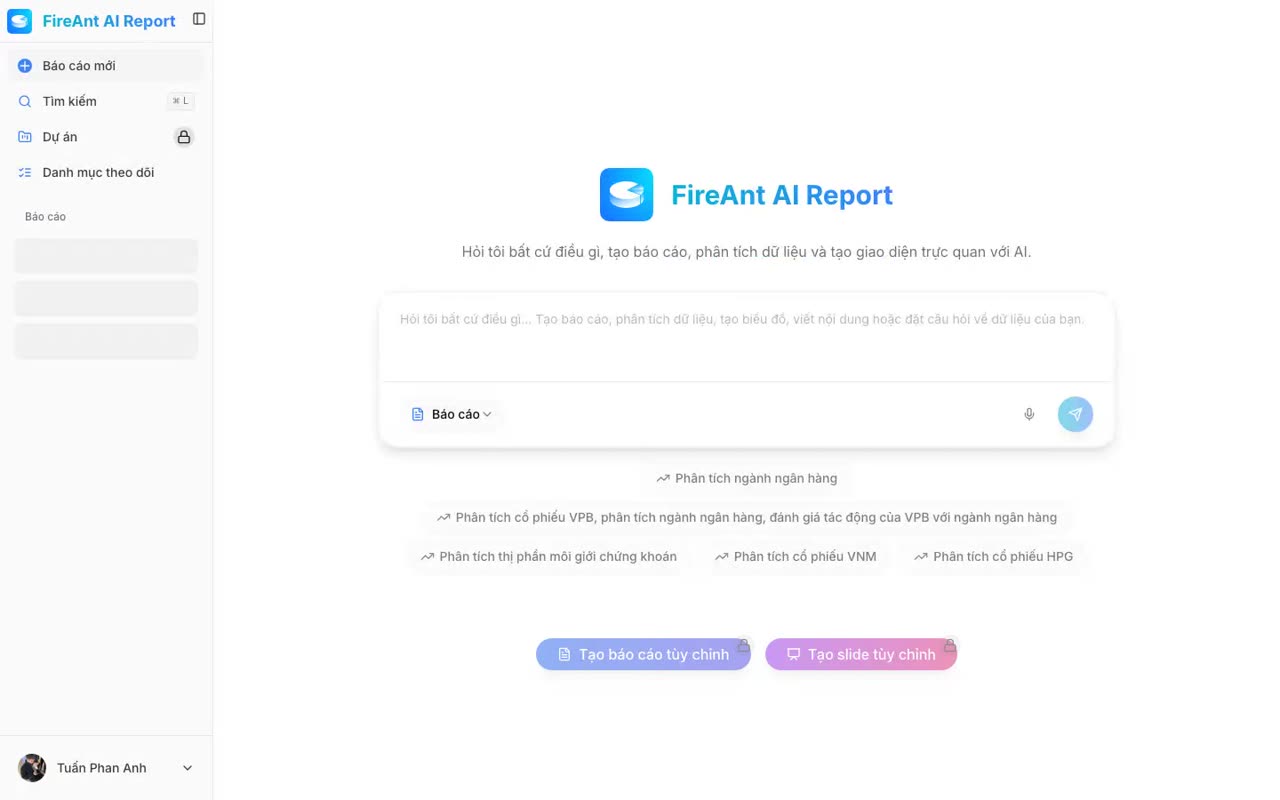
- Mở trang chủ FireAnt AI Report.
- Chọn loại đầu ra Slide trong combobox.
- Nhập yêu cầu vào ô Hỏi tôi bất cứ điều gì... (ví dụ: "Bộ slide đào tạo phân tích kỹ thuật cơ bản").
- Nhấn nút Gửi (biểu tượng máy bay giấy) hoặc phím Enter để bắt đầu sinh slide.
- Nút Tạo slide tùy chỉnh ở dưới khởi tạo một bộ slide rỗng — không đọc nội dung ô prompt. Dùng nút này khi muốn tự dựng slide từ đầu.
- Có thể chọn nhanh từ gợi ý mẫu ngay dưới ô prompt.
- Bộ slide vừa tạo nằm trong danh sách báo cáo gần đây của bạn.
Overview
The home page lets you describe what you want to present and have the AI generate a full slide deck complete with layout, charts and speaker notes. Useful when you need to quickly prepare presentation material for a client, an internal meeting, or a training session.
Prerequisites
- Signed in to a FireAnt account.
- A Premium account is required.
Steps
- Open the FireAnt AI Report home page.
- Choose Slide as the output type in the combobox.
- Type your request into the Ask me anything... box (for example: "Training deck on basic technical analysis").
- Click the Send button (paper-plane icon) or press Enter to start generating the slides.
- The Create Custom Slide button at the bottom creates an empty deck — it does not read the prompt box. Use that button when you want to build the deck from scratch.
- You can also pick a template suggestion right under the prompt box for a quick start.
- A newly created slide deck appears in your recent reports list.
개요
홈 화면에서 발표하고자 하는 내용을 설명하면 AI가 레이아웃, 차트, 발표 스크립트를 포함한 전체 슬라이드 덱을 생성합니다. 고객 미팅, 사내 발표, 교육 자료를 빠르게 준비해야 할 때 적합합니다.
사전 조건
- FireAnt 계정으로 로그인되어 있어야 합니다.
- 프리미엄 계정이 필요합니다.
단계
- FireAnt AI Report 홈 화면을 엽니다.
- 콤보박스에서 출력 형식 슬라이드를 선택합니다.
- 무엇이든 물어보세요... 입력란에 요청을 입력합니다 (예: "기본 기술적 분석 교육 슬라이드").
- 전송 버튼(종이비행기 아이콘) 또는 Enter 키를 눌러 슬라이드 생성을 시작합니다.
- 하단의 사용자 정의 슬라이드 만들기 버튼은 프롬프트 내용을 읽지 않고 빈 슬라이드 덱을 생성합니다. 슬라이드를 처음부터 직접 구성하고 싶을 때 사용하세요.
- 프롬프트 입력란 바로 아래의 추천 템플릿을 선택해 빠르게 시작할 수도 있습니다.
- 새로 만든 슬라이드 덱은 최근 보고서 목록에 표시됩니다.
概述
首页允许您描述想要演示的内容,让 AI 生成包含布局、图表和讲稿的完整幻灯片。适合为客户、内部会议或培训快速准备演示材料的场景。
前提条件
- 已登录 FireAnt 账号。
- 需要 高级版 账户。
步骤
- 打开 FireAnt AI Report 首页。
- 在组合框中选择输出类型 幻灯片。
- 在 问我任何问题... 输入框中输入请求(例如:"基础技术分析培训幻灯片")。
- 点击 发送 按钮(纸飞机图标)或按 Enter 键开始生成幻灯片。
- 底部的 创建自定义幻灯片 按钮创建一个 空 幻灯片——它不会读取提示框内容。如果您想从头开始构建幻灯片,请使用此按钮。
- 也可以从提示框下方的 模板建议 中快速选择。
- 新创建的幻灯片会显示在您的最近报告列表中。