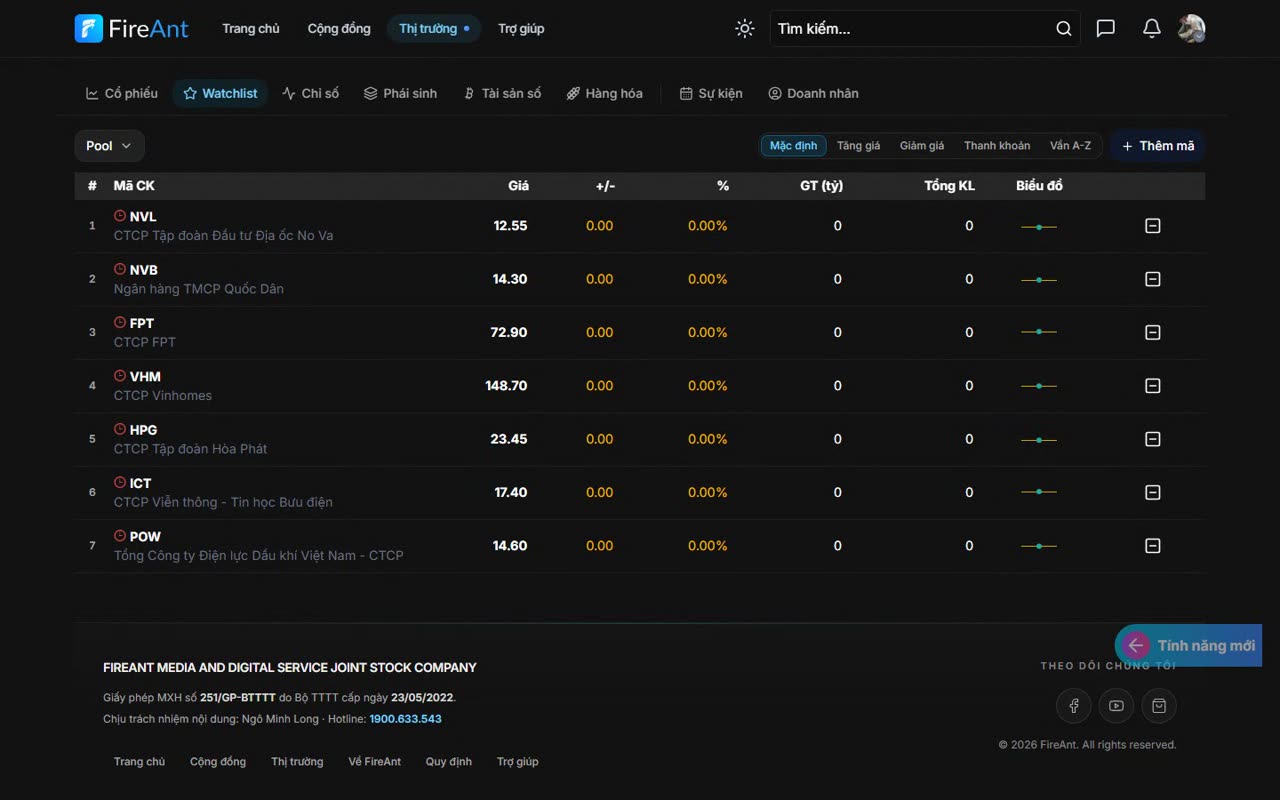
Tổng quan
Thêm mã vào Watchlist giúp bạn theo dõi giá, khối lượng và biến động của các mã quan tâm ở cùng một nơi.
Điều kiện
- Đăng nhập tài khoản FireAnt.
Các bước
- Mở Watchlist muốn chỉnh sửa.
- Bấm nút thêm mã hoặc biểu tượng dấu cộng.
- Tìm mã chứng khoán và chọn mã cần thêm.
- Bấm biểu tượng xóa trên dòng mã nếu muốn bỏ khỏi danh mục.
Overview
Adding a symbol to your Watchlist lets you track price, volume, and movement of the symbols you care about in one place.
Prerequisites
- Sign in to your FireAnt account.
Steps
- Open the Watchlist you want to edit.
- Click the add-symbol button or the plus icon.
- Search for the stock symbol and select the one you want to add.
- Click the delete icon on a symbol's row to remove it from the list.
Watchlist에 종목을 추가하면 관심 종목의 가격, 거래량, 변동 상황을 한곳에서 확인할 수 있습니다.
사전 조건
- 편집할 Watchlist를 엽니다.
- 종목 추가 버튼 또는 더하기(+) 아이콘을 클릭합니다.
- 종목 코드를 검색하여 추가할 종목을 선택합니다.
- 목록에서 제외하려면 해당 종목 행의 삭제 아이콘을 클릭합니다.
将股票代码添加到 Watchlist 后,您可以在同一个地方跟踪关注股票的价格、成交量和波动情况。
前提条件
- 打开要编辑的 Watchlist。
- 点击添加股票按钮或加号图标。
- 搜索股票代码并选择要添加的股票。
- 如需从列表中移除,点击该股票所在行的删除图标。